12 min read
The biggest website changes of 2026 were not design fads. They were platform and support-date changes: Laravel 13 arrived in March, PHP 8.5 became the newest supported PHP release, React moved to an independent foundation, and Google kept changing how it measures and displays websites. For Philippine businesses, the practical job this year is to check what your site runs on, how quickly it responds to taps on ordinary phones, and whether it still receives security fixes.
This guide skips the usual “use bold colours and add a chatbot” trend lists. Instead, it walks through the concrete technical changes ServicioPro tracked between late 2025 and October 2026, explains what each one means for a typical Philippine SME website or web app, and ends with a short action plan you can hand to your developer. Every date below comes from official project pages or reputable reporting, linked in the Sources section at the end.
1. The back-end calendar moved: Laravel 13 and PHP 8.5
Many Philippine business websites and web apps, from clinic booking pages to ordering portals and member areas, run on PHP, either through WordPress or a framework such as Laravel. In 2026, the support calendar for both shifted, and that calendar decides whether your site still gets security fixes.
Laravel 13
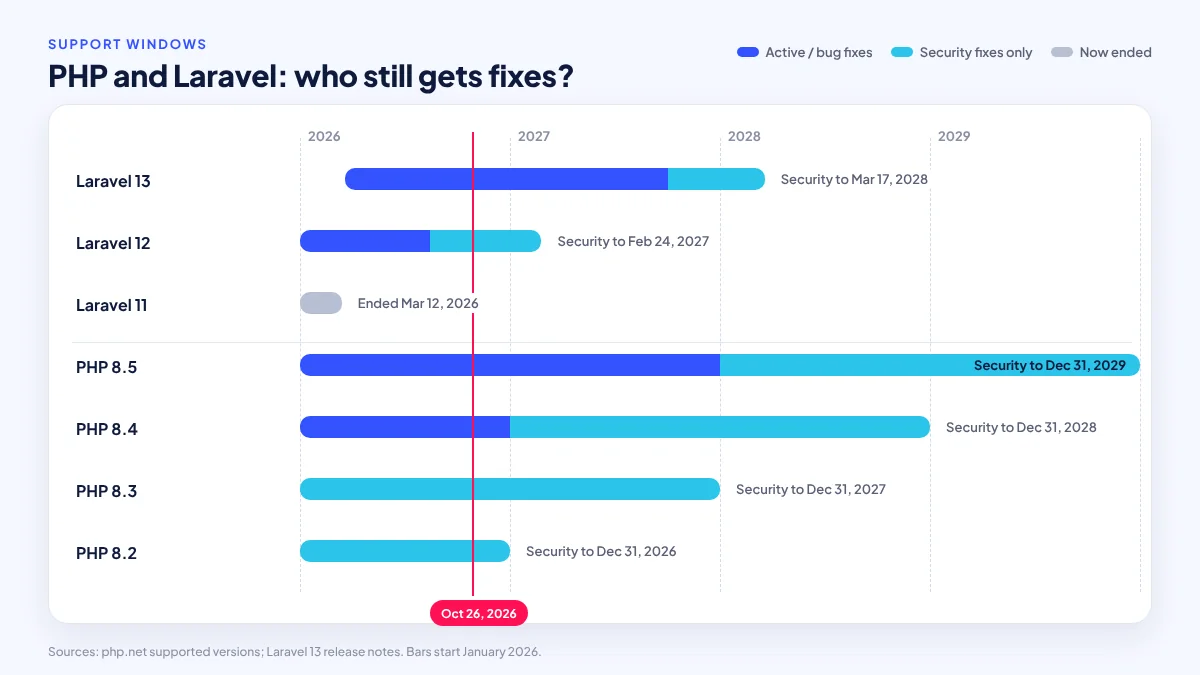
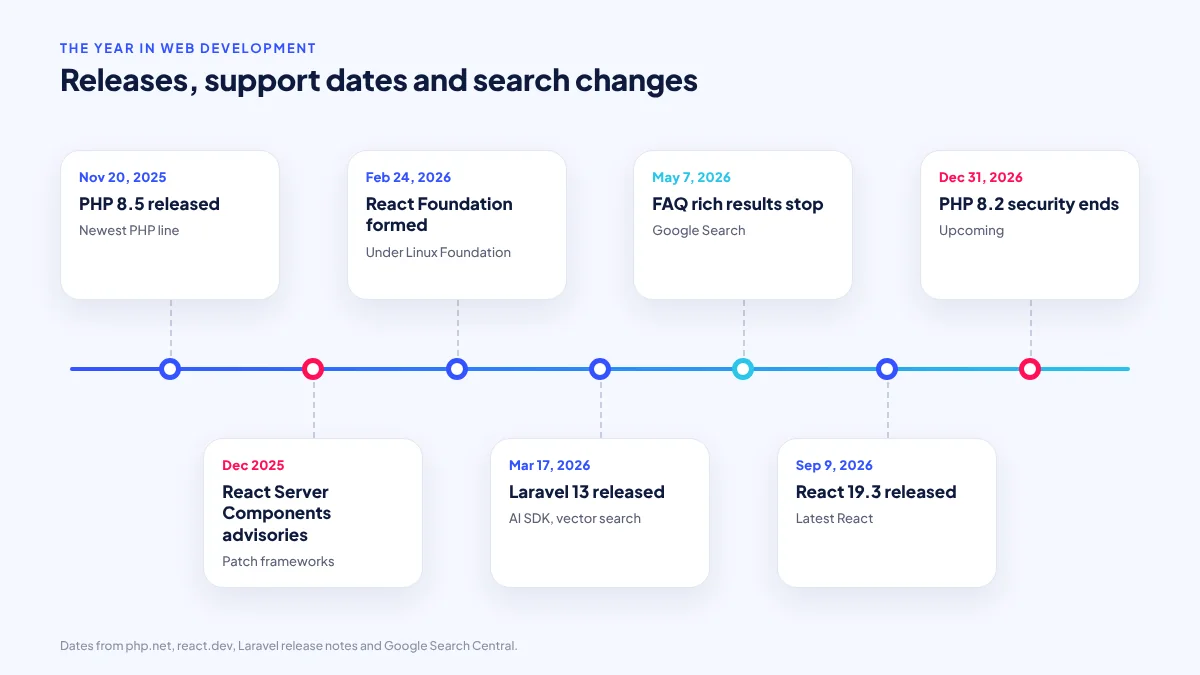
According to the official Laravel release notes, Laravel 13 was released on March 17, 2026. It requires PHP 8.3 to 8.5, receives bug fixes until the third quarter of 2027, and receives security fixes until March 17, 2028. It also ships a first-party AI SDK and vector search support, which we cover below.
The older versions matter just as much. Laravel 12 bug fixes ended on August 13, 2026, and its security fixes continue only until February 24, 2027. Laravel 11 security fixes already ended on March 12, 2026. If your web app was built on Laravel 11 or earlier, it is running without upstream security patches today. Our separate guide to Laravel 13 for business web applications covers upgrade planning in detail.
PHP 8.5 and the end of PHP 8.2
PHP 8.5 was released on November 20, 2025. The PHP supported versions page lists the following dates, which apply to WordPress sites as much as to custom builds:
| PHP version | Status in October 2026 | Active support until | Security fixes until |
|---|---|---|---|
| 8.5 | Active | December 31, 2027 | December 31, 2029 |
| 8.4 | Active | December 31, 2026 | December 31, 2028 |
| 8.3 | Security fixes only | Ended | December 31, 2027 |
| 8.2 | Security fixes only | Ended | December 31, 2026 |
| 8.1 and older | End of life | Ended | Ended |
Most shared and cPanel hosting plans used by Philippine SMEs let you switch the PHP version per site. The switch itself takes seconds. The work is testing: older plugins, themes and custom code can break on newer PHP versions, so the change should happen on a staging copy first. Our post on WordPress in 2026 explains how to keep plugins maintainable so these upgrades stay routine.
2. The front end: React’s new home and a security wake-up call
On the front end, two React events matter for business owners. First, React is now governed by the React Foundation under the Linux Foundation, announced on February 24, 2026, according to the React blog. This is a governance change, not a code change: existing React sites keep working, and the library is no longer steered by a single company. React 19.3 followed on September 9, 2026.
Second, and more urgent, the React team published critical security advisories on December 3 and December 11, 2025 affecting React Server Components, the feature that lets parts of a React site render on the server. If your site uses a framework built on Server Components, ask your developer to confirm the patched versions were installed. The lesson is simple: a modern JavaScript front end is not “just the design layer”. If parts of it run on a server, it needs the same patch discipline as a PHP back end.
Does a typical Philippine SME need React at all? Often not. A brochure site or service page is usually better served by WordPress or a lightweight custom build; React earns its place in interactive web apps such as dashboards and booking flows. Our comparison of WordPress vs custom websites goes through that decision.
3. Performance: INP and real Philippine phones
Interaction to Next Paint (INP) replaced First Input Delay as a Core Web Vital on March 12, 2024, according to web.dev. It is not new in 2026, but it is the responsiveness metric in force, and many sites are still tuned only for how fast the first screen loads.
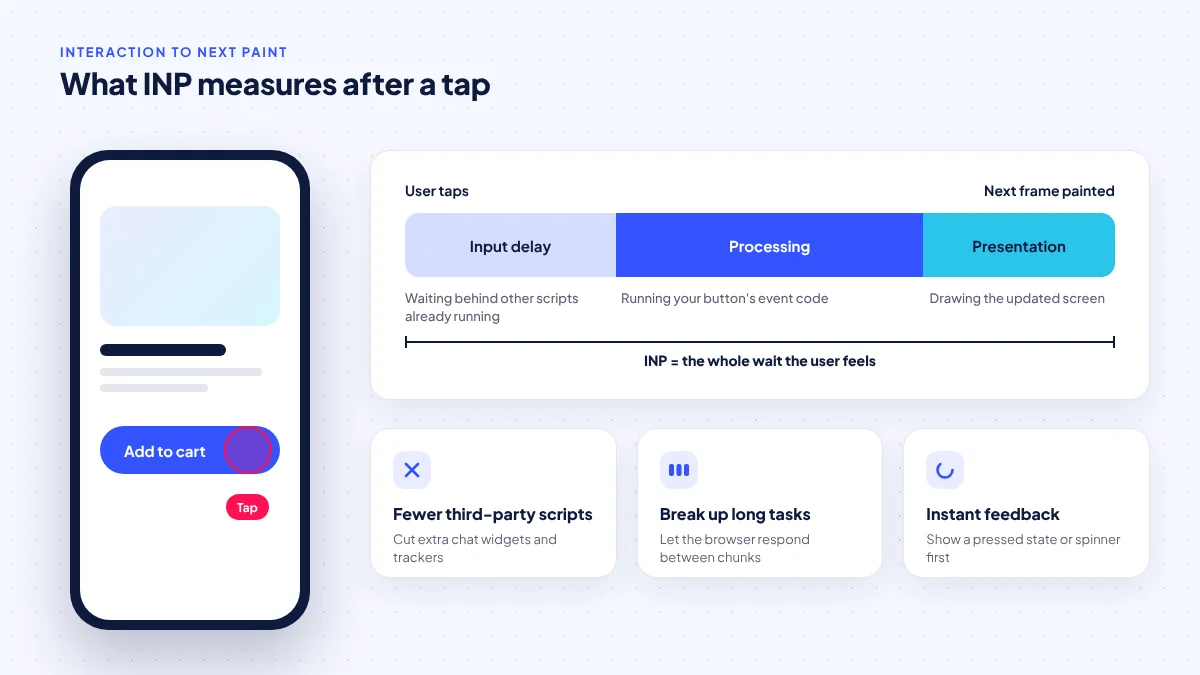
INP measures the delay between a user’s tap, click or key press and the next visual update on the screen, across the whole visit. A page can load quickly and still feel sluggish if pressing “Add to cart” or opening a menu freezes for half a second while scripts run.
This matters in the Philippines because so many visitors arrive on phones. DataReportal’s Digital 2026 Philippines report counts 98.0 million internet users (83.8% of the population) and 137 million mobile connections. Many of those phones are mid-range or budget Android devices, where heavy JavaScript hurts most.
The fixes are usually unglamorous:
- Remove or delay third-party scripts you do not need, especially multiple chat widgets, trackers and pop-up tools.
- Break long JavaScript tasks into smaller pieces so the browser can respond to taps in between.
- Give immediate visual feedback on buttons (a pressed state or spinner) before slow work finishes.
- Test on an actual budget Android phone on mobile data, not only on an office laptop.
Our guide to website speed on Philippine mobile data covers measurement and fixes step by step.
4. Search: fewer rich results, more AI summaries
Google’s search results changed shape again. According to Google’s FAQ structured data documentation, FAQ rich results stopped showing on May 7, 2026, and the documentation was removed on June 15, 2026. Adding FAQ schema to your pages no longer produces those expandable results, although a visible FAQ section can still help readers.
The Google Search Status Dashboard lists core updates on March 27 and May 21, 2026, and spam updates on March 24, June 24, August 18 and September 24, 2026. Google’s guidance on AI features says sites need no special optimisation to appear in them. Still, AI summaries affect clicks: a Pew Research Center analysis published July 22, 2025 found users clicked a result link in 8% of visits when an AI summary appeared, versus 15% when none did.
ServicioPro’s reading: a business website now has to earn the click with things a summary cannot replace, such as real prices, service areas, booking or ordering, contact options and proof of who you are. Our post on modern SEO foundations covers the technical basics.
5. AI features on business websites: useful when scoped
AI moved from novelty to framework feature. Laravel 13’s first-party AI SDK and vector search support mean a developer can add features such as “search our products by describing what you need” or “summarise this customer inquiry” without stitching together several third-party libraries.
Demand is there. Google, Temasek and Bain’s e-Conomy SEA 2025 report, as reported by NewsBytes.PH, found that 78% of Filipino digital users use AI tools. But accuracy is the catch. In the Stack Overflow 2025 Developer Survey, 84% of developers said they use or plan to use AI tools, yet only about 33% trust the accuracy of the output, while about 46% distrust it.
For a business site, that points to narrow, reviewable features: AI-assisted search over your own catalogue, draft replies that staff approve, or summaries of long forms. Avoid letting an AI answer pricing, medical, legal or refund questions unsupervised. Any feature that sends customer data to an AI provider also falls under the Data Privacy Act. Our guide to AI-powered websites and apps sets out what is realistic.
6. iPhone Home Screen web apps
A quieter change with real impact: according to WebKit’s WWDC25 announcement, in iOS 26 every site added to the Home Screen opens as a web app by default, without the Safari address bar. On Chrome and Edge, a Web Install API entered an origin trial in March 2026, which is still an experiment, not a finished standard.
For businesses, this means a customer who saves your site to their iPhone Home Screen gets an app-like window. If your site relies on the browser’s back button, that experience can feel broken. A proper web app manifest, a clear icon, in-page navigation and a visible way back to the home page now matter.
7. Security: the basics still decide outcomes
The security data from 2026 points in one direction. The Verizon 2026 Data Breach Investigations Report found that 31% of breaches started with exploitation of a vulnerability, ahead of stolen credentials. For WordPress specifically, Patchstack counted 11,334 new vulnerabilities in 2025, up 42%, with 91% in plugins, and 46% had no patch available when they were disclosed.
The OWASP Top 10:2025 list reflects this. Broken Access Control stays at number one, and two new categories appeared: Software Supply Chain Failures (A03) and Mishandling of Exceptional Conditions (A10). “Supply chain” here means the plugins, packages and services your site depends on.
In 2026, the most important website feature is not on the home page. It is a named person who updates the site every month.
If personal data is compromised, Philippine organisations also face the National Privacy Commission’s 72-hour breach notification rule under NPC Circular 16-03. Our article on lessons from the September 2026 data breaches shows why this is not theoretical.
What Philippine businesses should do before the end of 2026
Pulling these changes together, here is ServicioPro’s recommended order of work. It is our analysis, not an official checklist, and it assumes a small business with one website or web app.
- List your versions. Write down your PHP version, your CMS or framework version (WordPress, Laravel or other) and your hosting plan.
- Fix anything past its end date. PHP 8.1 or older, and Laravel 11 or older, should be upgraded first.
- Schedule PHP 8.2 sites. Security support ends December 31, 2026; plan a staging test and switch before then.
- Remove plugins you do not use and confirm the rest are actively maintained.
- Test responsiveness on a budget phone. Tap every main button and note any delay.
- Review your FAQ schema. Keep visible FAQs that help readers, but do not expect rich results from them.
- Check your Home Screen experience on an iPhone and add clear in-page navigation.
- Decide on AI with a narrow use case and a human review step, rather than a general chatbot.
Frequently asked questions
Do I need to rebuild my website because of these 2026 changes?
Usually not. Most of the changes call for upgrades and clean-up, not a rebuild. A rebuild makes sense only when the site is several versions behind, depends on abandoned plugins, or no longer fits how your business sells.
How do I find out which PHP version my website uses?
On cPanel hosting, the PHP version is usually shown under a “Select PHP Version” or “MultiPHP Manager” tool. In WordPress, the Site Health screen under Tools also shows it. Your developer or host can confirm it.
Is Laravel 13 worth it for a small business website?
For a simple brochure site, a full framework is often unnecessary. Laravel suits custom web apps such as booking systems, portals and internal tools. If you already run a Laravel app, moving to a supported version is the priority.
Should I remove the FAQ section from my pages?
No. Google stopped showing FAQ rich results in May 2026, but a visible FAQ still helps visitors find answers quickly. Simply do not rely on FAQ markup for extra search visibility.
Are AI chatbots now expected on business websites?
They are common, not expected. A narrow AI feature that saves your staff time or helps customers find products is usually more valuable than a general chatbot that may give wrong answers about prices or policies.
Sources
Researched October 26, 2026. Dates show when each source was published.
- Laravel 13 Release Notes, Laravel, page consulted October 26, 2026.
- Supported Versions, PHP.net, page consulted October 26, 2026.
- React Blog (React 19.3, React Foundation, security advisories), React, posts dated December 3, 2025 to September 9, 2026.
- Interaction to Next Paint becomes a Core Web Vital on March 12, web.dev, 2024.
- Digital 2026: The Philippines, DataReportal, November 5, 2025.
- FAQ (FAQPage) structured data, Google Search Central, 2026.
- Google Search Status Dashboard: Ranking incident history, Google, page consulted October 26, 2026.
- Google users are less likely to click on links when an AI summary appears in the results, Pew Research Center, July 22, 2025.
- PH digital economy to hit $36B in 2025, leads SEA in AI adoption, NewsBytes.PH, November 26, 2025.
- 2025 Developer Survey: AI, Stack Overflow, 2025.
- News from WWDC25: Web technology coming this fall in Safari 26 beta, WebKit, June 9, 2025.
- 2026 Data Breach Investigations Report, Verizon, 2026.
- State of WordPress Security in 2026, Patchstack, February 25, 2026.
- OWASP Top 10:2025 Introduction, OWASP Foundation, 2025.
- NPC Circular 16-03: Personal Data Breach Management, National Privacy Commission, 2016.