9 min read
Flutter is a strong choice for most Philippine business apps, such as ordering, booking, delivery and loyalty apps, because one codebase serves both Android and iPhone. Native development in Swift (iOS) and Kotlin (Android) still wins when an app lives on platform-specific features: brand-new OS capabilities, on-device AI frameworks, augmented reality, wearables and widgets, demanding background location, or hardware SDKs that only ship for native code. Many projects are best served by Flutter with a few native modules rather than a choice of one or the other.
ServicioPro has written before about Flutter vs React Native and native vs hybrid vs web apps. This article is the counterpoint: specific situations where Flutter is not the right tool, and how to tell whether your project is one of them. The technical points are general platform knowledge; version dates come from official sources listed at the end.
Why Flutter is popular, and where its limits come from
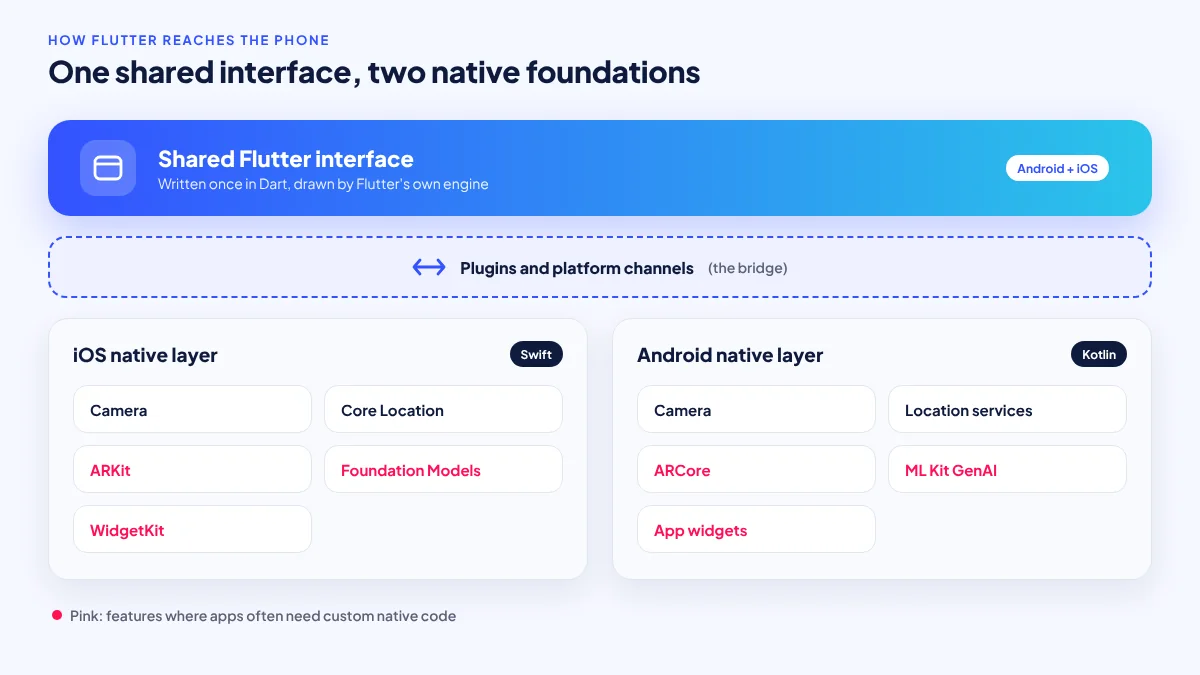
Flutter lets a team write one Dart codebase that runs on Android and iOS. It draws every pixel of the interface with its own rendering engine instead of using each platform’s built-in interface components. That is why Flutter apps look identical on both platforms and why the framework can move fast: it does not wait for Apple or Google to change their components.
The framework is actively maintained. According to the Flutter release notes, the current stable line is 3.47, including a 3.47.8 security patch, and Flutter 3.50 is targeted for November 2026. Dart 3.13 was released on August 12, 2026, according to the Dart blog.
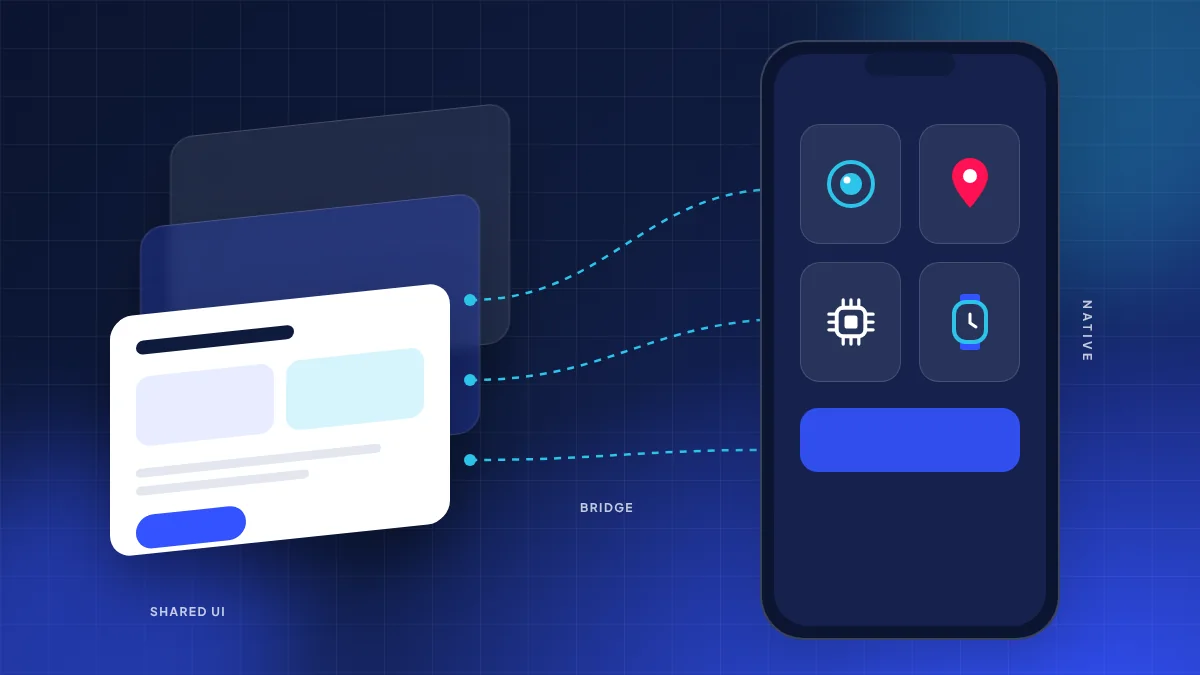
The trade-off sits underneath. Anything that is not drawing the interface, such as the camera, GPS, Bluetooth, sensors, notifications, payments or AI frameworks, belongs to the operating system. Flutter reaches those through plugins, which are packages containing native Swift or Kotlin code connected to Dart through “platform channels” or direct foreign-function calls. When a good plugin exists, this is invisible. When it does not, someone writes the native code by hand.
Seven cases where native still wins
These are the situations where, in ServicioPro’s analysis, building natively (or mostly natively) usually costs less over the life of the app.
1. You need new OS features on day one
Apple released iOS 27 on September 14, 2026, according to MacRumors, and Android 17 (API 37) reached stable on June 16, 2026, according to 9to5Google. New APIs are available to Swift and Kotlin developers immediately. Flutter plugins for them arrive later, if at all. If your product strategy depends on being first with a new platform capability, native removes that wait.
2. Your app is built around on-device AI
Apple’s Foundation Models framework, announced at WWDC25 on June 9, 2025, gives apps access to Apple’s on-device model, which works offline, as reported by TechCrunch. It is a Swift framework. On Android, Google’s ML Kit GenAI APIs use Gemini Nano for summarisation, proofreading, rewriting and image description, with a Prompt API in beta. A Flutter app can call both through native bridges, but if AI is the core of the product, you will spend much of your time in Swift and Kotlin regardless. Our guide to AI-powered websites and apps covers device and language limits.
3. Augmented reality and camera-heavy features
AR relies on ARKit on iOS and ARCore on Android, plus tight camera and sensor timing. Flutter AR plugins exist, but they are generally community-maintained and trail the native frameworks. Furniture placement, virtual try-on and measuring tools are usually better built natively.
4. Watch apps, Home Screen widgets and other extensions
Flutter does not officially target watchOS, and iPhone Home Screen widgets are built with Apple’s native widget framework in SwiftUI. On Android, widgets also use native tools. A Flutter app can ship these as native extensions alongside the Flutter code, but if the watch or widget is the main experience, such as a fitness tracker or transit countdown, native is the natural fit.
5. Demanding background location
Driver, rider and field-service apps need location updates while the app is in the background or the screen is off. Android and iOS handle this very differently, with their own permission prompts, battery rules and background limits, and both tighten them over time. Flutter location plugins work for many apps, but when tracking must be reliable for hours on budget phones, teams often end up writing and tuning native code per platform. This matters for anyone building a ride-hailing or delivery product; see our post on maps and location APIs at scale.
6. Hardware and vendor SDKs
Philippine business apps often connect to Bluetooth thermal receipt printers, card readers, barcode scanners or identity-verification SDKs. Many vendors ship only native Android and iOS libraries. If your app depends on several of these, each one needs a native wrapper, and the shared Flutter layer saves less effort than expected.
7. The app must feel exactly like the platform
Because Flutter draws its own interface, its iOS-style components imitate Apple’s rather than using them. When Apple or Google changes its design language, native apps generally pick up the new look and behaviours as soon as they are rebuilt, while Flutter’s versions are updated on the framework’s own schedule. For most business apps this does not matter. For an app whose brand promise is to feel perfectly at home on iPhone, it can.
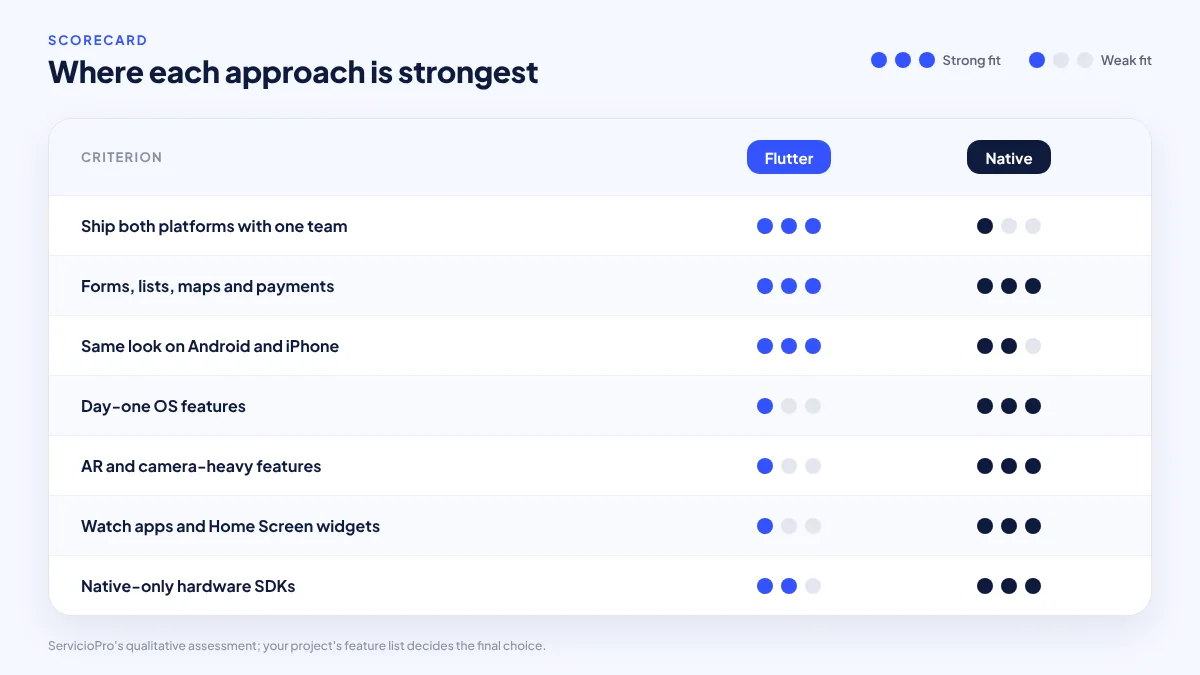
Flutter vs native by scenario
The table below summarises ServicioPro’s view. “Good” means the approach handles the scenario well with ordinary effort.
| Scenario | Flutter | Native | Notes |
|---|---|---|---|
| Ordering, booking, loyalty, catalogue apps | Good | Good | Flutter usually cheaper: one codebase |
| Day-one use of new iOS or Android APIs | Delayed | Good | Plugins arrive after release |
| Apple Foundation Models features | Via bridge | Good | Framework is Swift-based |
| AR features | Limited | Good | Relies on ARKit and ARCore |
| Watch apps and Home Screen widgets | Needs native extension | Good | Built with platform tools |
| All-day background location | Possible with tuning | Good | Per-platform work either way |
| Multiple native-only hardware SDKs | Wrapper per SDK | Good | Check vendor SDK support first |
| Small team, tight budget, both platforms | Good | Costly | Two native codebases need more people |
The middle path: Flutter plus native modules
Choosing between “all Flutter” and “all native” is often a false choice. Common hybrid patterns include:
- Flutter app with custom native plugins. The shared interface is Flutter; specialised features, such as a printer driver or on-device AI call, are written in Swift and Kotlin and exposed to Dart.
- Native extensions beside a Flutter app. Widgets, watch apps and share extensions are built natively and share data with the Flutter app.
- Flutter inside a native app. Flutter’s “add-to-app” approach lets an existing native app use Flutter for selected screens, which suits gradual migrations.
The hybrid route only works if your team, or your developer, is comfortable in Swift and Kotlin as well as Dart. Ask about this before you sign.
The question is not “Flutter or native?” It is “how much of this app is interface, and how much is platform?”
When Flutter is still the right call
For balance: most Philippine business apps we see are interface-heavy and platform-light. Flutter remains the better choice when:
- The app is mostly screens, forms, lists, maps and payments that existing, well-maintained plugins already cover.
- You need Android and iPhone versions on one budget and one timeline.
- One team will maintain the app long term, and consistency between platforms matters more than platform-perfect feel.
- You want to launch, learn and iterate quickly, as described in our startup MVP tech stack guide.
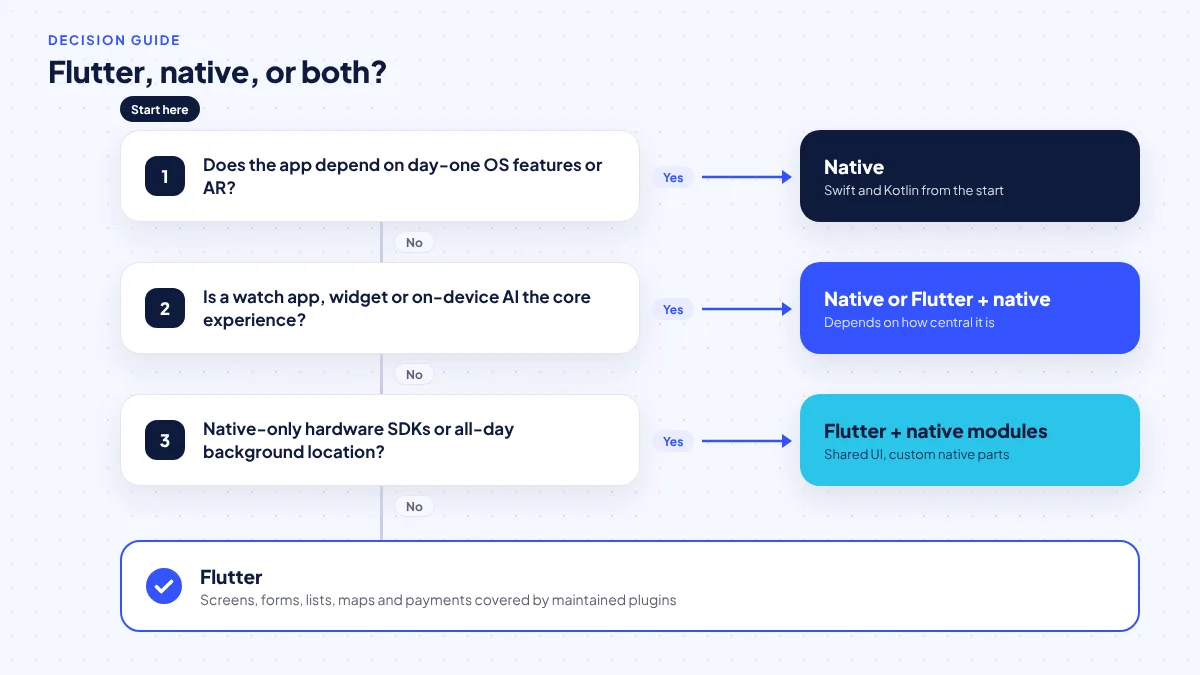
Five questions to settle before choosing
- List every device feature the app needs: camera, GPS, Bluetooth, NFC, sensors, AI, widgets, watch.
- Check plugin health for each one: is there a maintained Flutter plugin, updated for the latest OS versions?
- Check vendor SDKs for printers, payments or ID verification: do they support Flutter, or only native?
- Decide how important day-one OS features are to your business model.
- Confirm your team’s skills in Dart, Swift and Kotlin, and who will maintain the app after launch.
If most answers point to existing plugins and standard features, Flutter is likely right. If several point to native-only SDKs or platform features, consider native or the hybrid approach.
Frequently asked questions
Is Flutter slower than native?
For typical business screens, users rarely notice a difference. Performance gaps tend to show up in demanding graphics, AR, heavy camera processing or very long-running background work rather than in ordinary lists and forms.
Can a Flutter app use Apple’s on-device AI?
Yes, through native Swift code connected to Flutter, because Apple’s Foundation Models framework is a Swift framework. If AI is central to your app, expect much of the work to be native.
Is a ride-hailing driver app better native?
Not necessarily. Many succeed with Flutter, but background location must be tested and tuned carefully on each platform, especially on budget Android phones. Plan for some native work either way.
Can I switch from Flutter to native later?
Yes, though it means rewriting the interface. Flutter’s add-to-app approach can also run in reverse, letting a native app replace Flutter screens gradually. Keeping business logic on a well-designed backend makes either move easier.
Does building native cost twice as much?
There is no reliable published benchmark for the Philippines. Native usually means two codebases and often two specialists, so cost rises with app size. For feature-heavy, platform-specific apps, the gap narrows because Flutter would need native code too.
Sources
Researched October 26, 2026. Dates show when each source was published.
- Flutter release notes, Flutter, page consulted October 26, 2026.
- Dart blog (Dart 3.13), Dart, August 12, 2026.
- Apple announces iOS 27 release date, MacRumors, September 9, 2026.
- Android 17 release schedule, 9to5Google, February 14, 2026.
- Apple lets developers tap into its offline AI models, TechCrunch, June 9, 2025.
- ML Kit GenAI APIs, Google for Developers, updated October 21, 2026.
- Meet Google Play’s target API level requirement, Android Developers, updated October 17, 2026.