12 min read
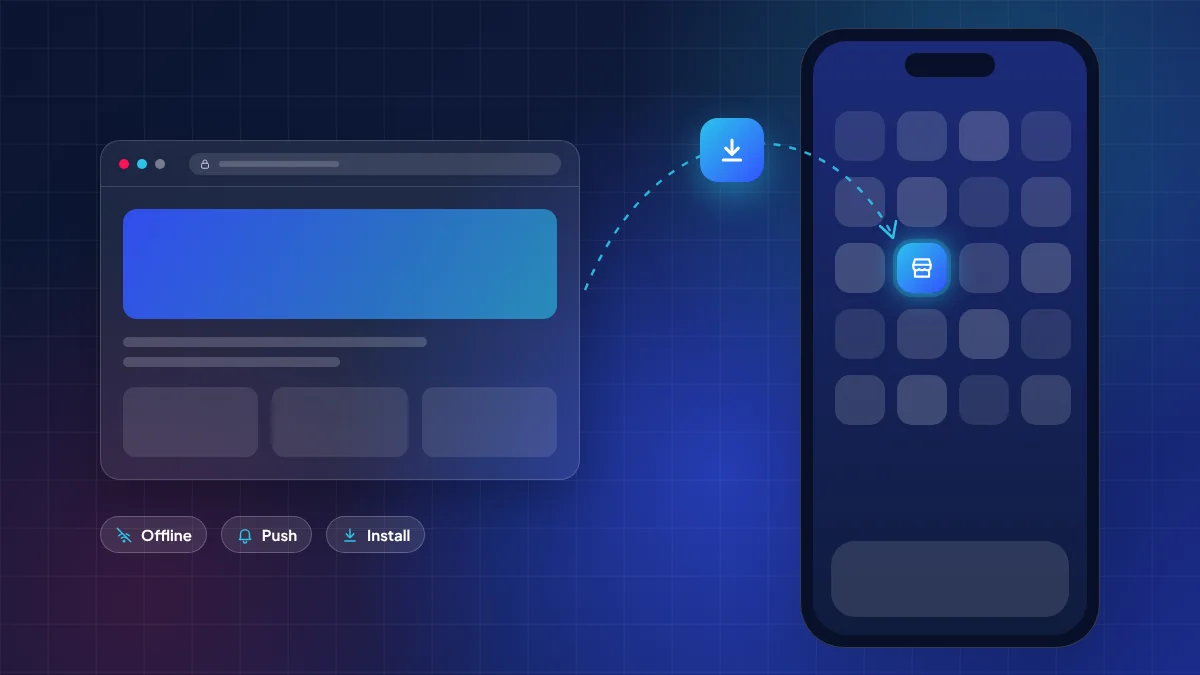
A progressive web app (PWA) is a website that can be added to a phone’s home screen and behave like an app: it opens full-screen, can work offline and, on supported platforms, can send push notifications. In 2026 the gap between PWAs and store apps narrowed again: iOS 26 opens every site saved to the Home Screen as a web app by default, and Chrome and Edge are trialling a Web Install API. For many Philippine businesses a well-built PWA is now enough; for others, a store app is still the right call.
This guide explains what actually changed on iPhone and Android, what a PWA can and cannot do today, and how to decide. It is written for business owners, not browser engineers, so we focus on outcomes: reach, cost drivers, reliability on Philippine mobile data, and what your customers will experience.
What a progressive web app actually is
A PWA is not a separate technology; it is a website built to a higher standard. Three ingredients make it “app-like”:
- A web app manifest — a small file that tells the phone the app’s name, icon, colours and whether to open full-screen (without the browser address bar).
- A service worker — a script that sits between the app and the network. It can cache screens and data so the app still opens on a weak signal, and it handles push messages.
- HTTPS — PWAs require a secure connection, which any modern business website should already have.
Because a PWA is still a website, it is found through Google, shared through a link in Messenger or Viber, and updated the moment you deploy. There is no app store review and no update the user must download. That is the core trade: you gain reach and speed of iteration, and you give up some device access and the visibility of an app store listing.
If you are still choosing between approaches in general, our earlier comparison of native vs hybrid vs web apps covers the fundamentals. This article focuses on what is new.
What changed on iPhone: iOS 26 Home Screen web apps
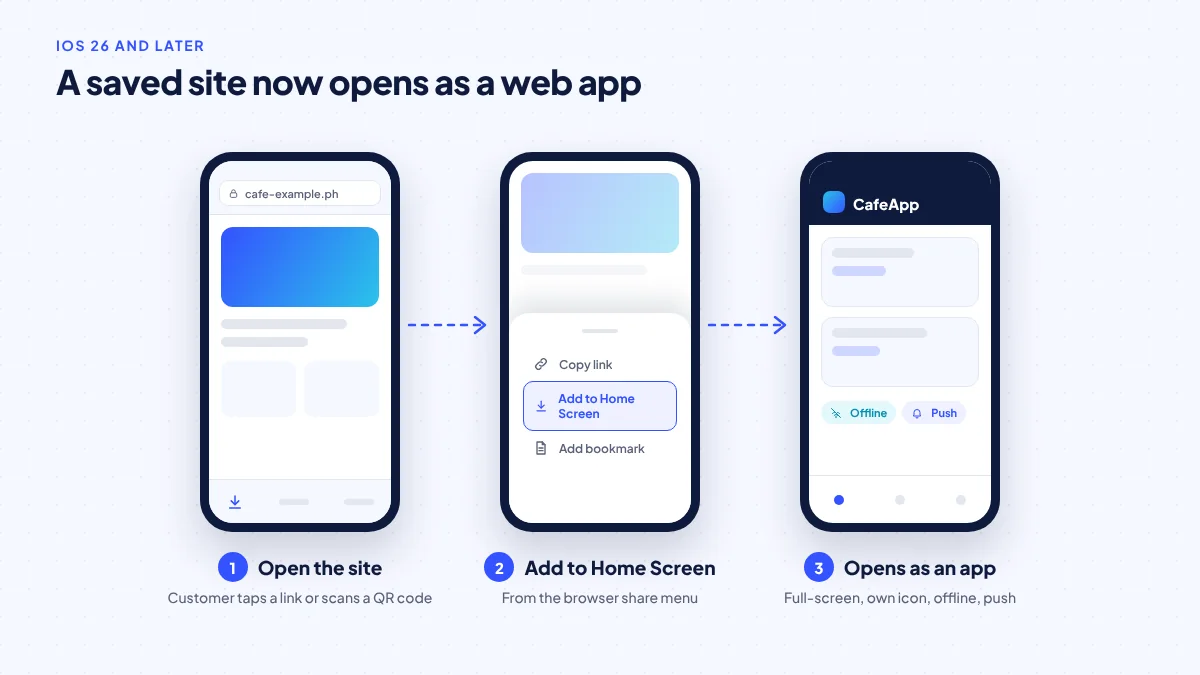
For years, the iPhone was the weak spot for PWAs. Users had to know about “Add to Home Screen” in Safari’s share menu, and whether a saved site opened like an app depended on how the developer had configured it.
At WWDC25 on June 9, 2025, Apple’s WebKit team announced that in iOS 26 every site added to the Home Screen opens as a web app by default. In practice this means a customer who saves your online menu or booking page gets a full-screen, app-style experience even if the site was not specially configured, and a properly built PWA gets its own icon, name and offline behaviour.
Two practical consequences for Philippine businesses:
- Your manifest and icons matter more. If a customer saves your site, the name and icon they see come from your manifest. A missing or blurry icon now looks like a broken app, not just a bookmark.
- Navigation must work without the browser. In web-app mode there is no Safari back button or address bar. Every screen needs its own way back, and links to external sites should be handled deliberately.
iOS 27, released on September 14, 2026 according to MacRumors, runs on iPhone 11 and newer. That matters because older iPhones are still common in the Philippine second-hand market; test on the oldest device your customers are likely to use, not only on the newest.
Push notifications on iPhone
Web push for Home Screen web apps arrived with iOS 16.4. The important condition is the word “Home Screen”: on iPhone, a user generally has to add your PWA to the Home Screen and then grant permission before you can send push messages. That is an extra step compared with a store app, so plan an in-app prompt that explains the benefit (“Get notified when your order is out for delivery”) at the right moment rather than on first visit.
What changed on Android and desktop: the Web Install API trial
Android has long been friendlier to PWAs. Chrome can show an install prompt, installed PWAs appear in the app drawer, and push notifications work without extra steps. The 2026 change is about how installation is triggered.
According to InfoQ’s March 27, 2026 report, Chrome and Edge opened an origin trial of a Web Install API. An origin trial is an experiment: sites register to test a new browser feature before it is standardised. The idea is to give websites a cleaner, more explicit way to offer installation, for example an “Install app” button that calls a standard browser function.
On Android, also remember the store side of the ecosystem is changing. Google Play now requires new apps and updates to target Android 16 (API level 36) from August 31, 2026, with an extension available to November 1, 2026, according to the Android Developers target API page. A PWA served from your own domain is not subject to that yearly target-API cycle, which is one reason PWAs can be cheaper to maintain. If you wrap a PWA into a Play Store listing, however, that wrapper is an Android app and the target-API rules apply to it.
What a PWA can and cannot do in 2026
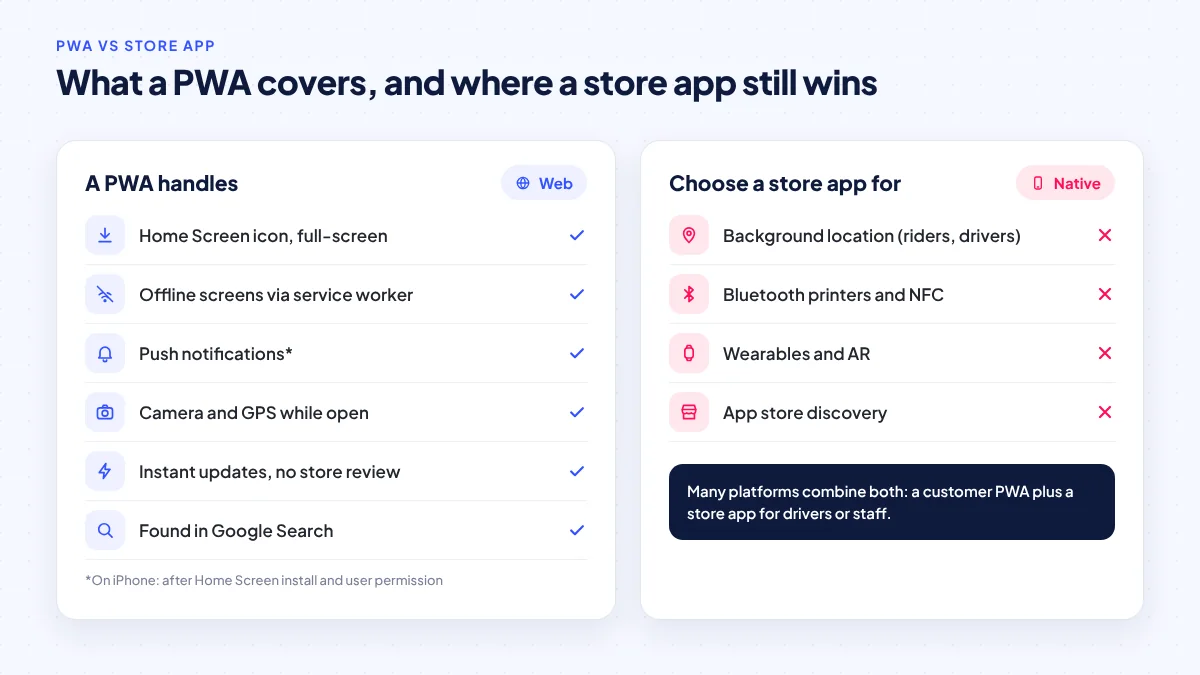
The table below is ServicioPro’s practical summary for business owners. Capabilities vary by browser and device, so always test on the phones your customers actually use.
| Capability | PWA on Android (Chrome) | PWA on iPhone (iOS 26+) | Store app |
|---|---|---|---|
| Home screen icon, full-screen | Yes | Yes, by default when saved | Yes |
| Works offline (cached screens) | Yes, via service worker | Yes, via service worker | Yes |
| Push notifications | Yes | Yes, after Home Screen install and permission | Yes |
| Camera, foreground GPS | Yes | Yes | Yes |
| Continuous background location | Not suitable | Not suitable | Yes, with OS permissions |
| Bluetooth printers, NFC, wearables | Limited | Very limited | Yes |
| Discovery | Google Search, links | Google Search, links | App store plus search |
| Updates | Instant on deploy | Instant on deploy | Store review and user update |
The row that most often decides the matter in the Philippines is background location. A rider or driver app that tracks position while the screen is off cannot rely on a PWA. That is why delivery and ride-hailing driver apps are native or cross-platform store apps, while the customer side can sometimes be a PWA. Our guide on when native still wins goes deeper into device-heavy cases.
Why PWAs suit Philippine mobile conditions
DataReportal’s Digital 2026 report counts 98.0 million internet users in the Philippines (83.8% of the population) and 137 million mobile connections, according to its November 5, 2025 release. Most of those users reach the web on phones, often on prepaid data and with varied signal quality. Three PWA traits fit that reality:
- No large download before first use. A customer can try your ordering page from a link without committing storage space or data to an app.
- Offline caching. A service worker can keep the menu, last order and account screen available when the signal drops, then sync when it returns. See our article on offline-first resilience for patterns that also apply to PWAs.
- One codebase for all phones. Android and iPhone users get the same experience from the same deployment.
Payments are another fit. The BSP reported that digital payments reached 64.7% of retail payment volume in 2025, with QR Ph transactions overtaking cards, as reported by the Daily Tribune. A PWA can take e-wallet, QR Ph and card payments through a payment gateway’s web checkout, just like a website. Our guide to GCash and Maya payments on websites and apps explains the options.
If your customers mostly arrive from a link, a search or a QR code on the counter, a fast PWA meets them where they already are.
When a PWA is enough: a decision matrix
Use this matrix, which reflects ServicioPro’s own analysis, as a starting point. If most of your answers fall in the left column, start with a PWA.
| Question | Points to PWA | Points to store app |
|---|---|---|
| How do users find you? | Search, social links, QR codes | They search the app store by name |
| How often do they use it? | Occasionally, or weekly | Many times a day |
| Does it track location with the screen off? | No | Yes (riders, drivers, field staff) |
| Hardware needs? | Camera, GPS while open | Bluetooth printers, NFC, wearables, AR |
| How fast must you change it? | Weekly or daily updates | Monthly releases are fine |
| Who are the users? | Customers, staff on mixed phones | Dedicated drivers or power users |
Typical good fits for a PWA
- Restaurant and café ordering, including pickup and table QR ordering.
- Clinic, salon and service bookings with reminders.
- Loyalty cards and member portals.
- Internal tools: stock counts, approvals, sales reporting.
- Event, school and community information apps.
Typical cases for a store app
- Rider and driver apps for delivery or ride-hailing that need background GPS.
- E-wallet style apps that need strong device binding and native security features.
- Apps that print receipts over Bluetooth or read NFC cards.
- Products where being listed in the App Store and Google Play is itself part of the marketing.
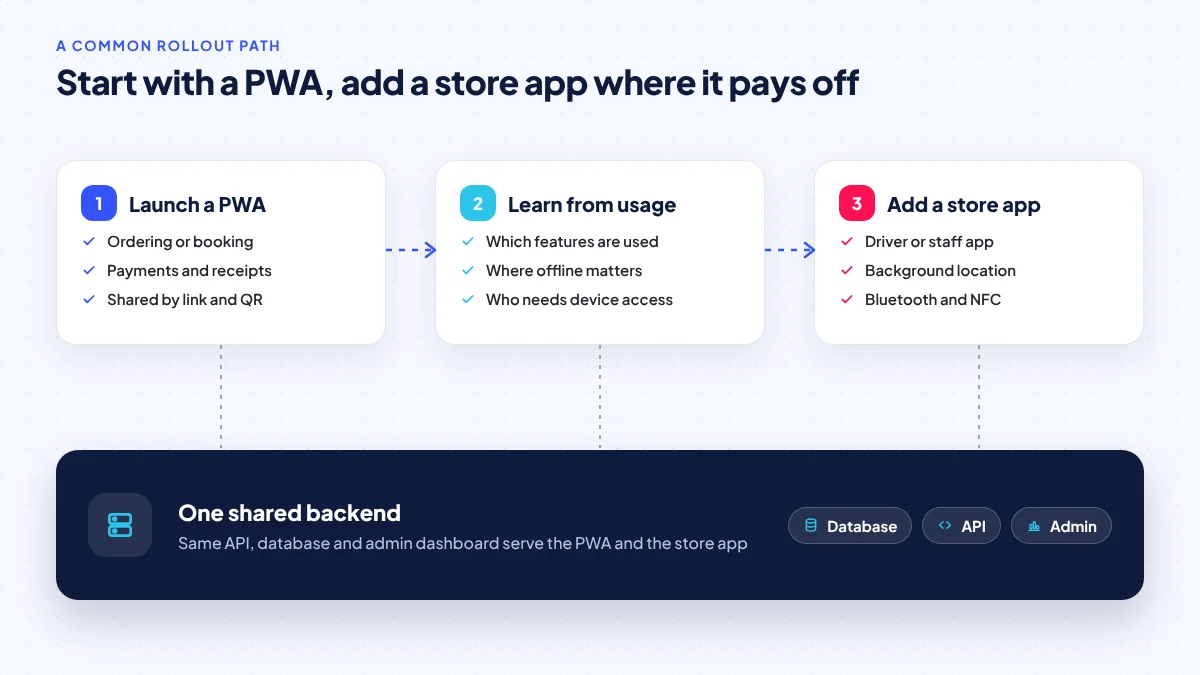
Many businesses end up with both: a customer-facing PWA and a store app for drivers or staff, sharing one backend. That is the model behind most on-demand platforms; see our overview of on-demand app development.
How to build a PWA that feels like a real app
A PWA that is just a slow website with an icon will disappoint users. This is the checklist we recommend:
- Write a complete manifest: short name (under 12 characters so it is not cut off under the icon), maskable icons, theme colour and display mode.
- Design for no browser chrome: visible back buttons, a clear header and handling for links that leave your app.
- Cache the shell and key data: the app should open instantly and show the last known content offline, with a clear “You are offline” banner.
- Ask for push at the right moment: after an order or booking, not on first page load. On iPhone, guide the user to add to Home Screen first.
- Offer installation in context: a dismissible “Add to Home Screen” card on Android, a short visual guide on iPhone, and the Web Install API only as an enhancement.
- Keep pages light: compress images, limit third-party scripts and test on mid-range phones and slow connections. Our post on website speed on Philippine mobile data lists practical targets.
- Test on real devices: at least one older iPhone, one current iPhone and two Android phones from different makers.
Cost drivers: PWA vs store app
There is no reliable published benchmark for app costs in the Philippines, so we describe the drivers rather than quote averages. A PWA usually costs less to launch and maintain because there is one codebase, no store accounts or review cycles, and no yearly target-API updates. Costs rise with offline sync complexity, the number of payment methods, real-time features such as live order tracking, and admin dashboards. A store app adds platform-specific testing, store listings, review delays and periodic updates to keep up with Android and iOS requirements. For our own pricing, business websites start from ₱5,000 and white-label apps range from ₱100,000 to ₱800,000; see mobile app development cost for the factors behind those ranges.
Frequently asked questions
Can a PWA be listed on Google Play?
Yes, a PWA can be packaged in a thin Android wrapper and published on Google Play. That wrapper is an Android app, so it must follow Play policies, including the target API level requirements. On the Apple App Store, a simple wrapped website is generally harder to get approved, so plan for real native features if you need an iOS listing.
Do PWAs work on older iPhones?
PWAs work in Safari on older iOS versions, but the iOS 26 behaviour of opening every Home Screen site as a web app only applies to iOS 26 and later. Test your app on the oldest iPhone your customers commonly use.
Will my PWA show up in Google Search?
Yes. A PWA is a website, so its public pages can be indexed and ranked like any other page. That is one of the biggest advantages over a store-only app.
Can a PWA accept GCash or Maya payments?
Yes, through a payment gateway’s web checkout or redirect flow, the same way a website does. The user experience is very close to a store app’s checkout.
Should I wait for the Web Install API before building?
No. It is an origin trial in Chrome and Edge and may change. A PWA built today installs on Android through the browser’s existing prompt and on iPhone through Add to Home Screen; you can add the new API later.
Sources
Researched October 26, 2026. Dates show when each source was published.
- News from WWDC25: Web technology coming this fall in Safari 26 beta, WebKit, June 9, 2025.
- Web Install API origin trial, InfoQ, March 27, 2026.
- Meet Google Play’s target API level requirement, Android Developers, updated October 17, 2026.
- Apple announces iOS 27 release date, MacRumors, September 9, 2026.
- Digital 2026: The Philippines, DataReportal, November 5, 2025.
- BSP: Digital payments account for nearly two-thirds of retail volume, Daily Tribune, August 19, 2026.