10 min read
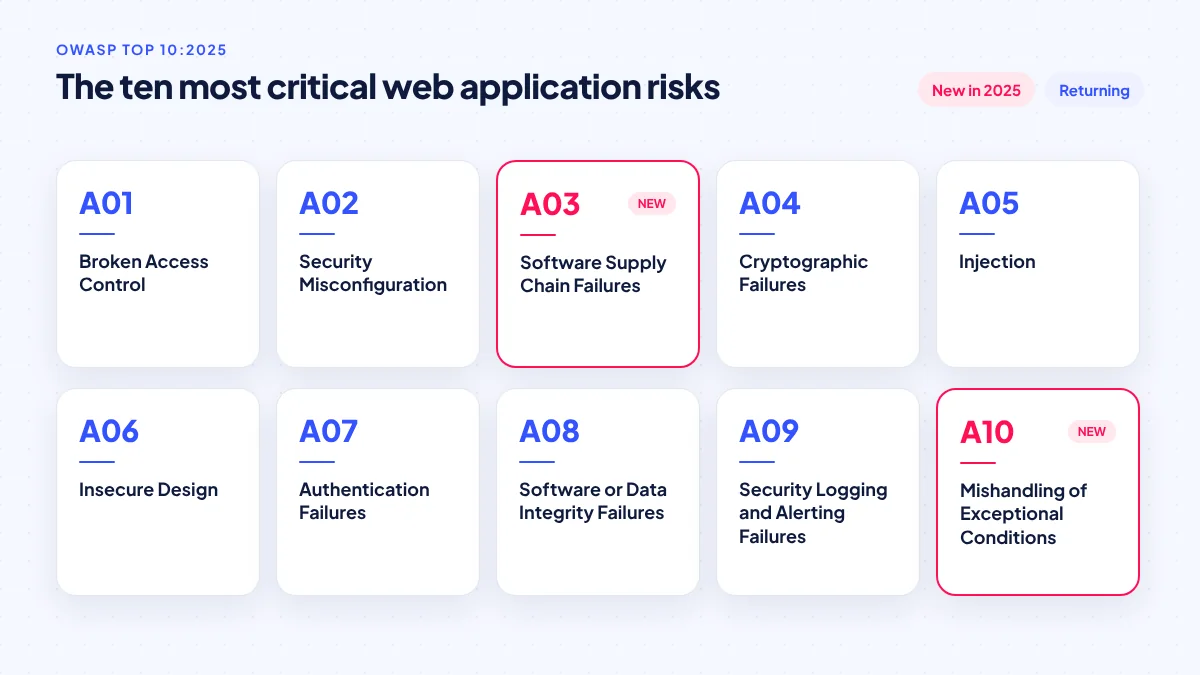
The OWASP Top 10:2025 is the latest edition of the most widely used list of critical security risks for web applications. Broken access control is still number one, security misconfiguration rose to second, and two categories are new: software supply chain failures and mishandling of exceptional conditions. For a Philippine business with a website, online shop or app, the list is a practical way to ask your developer the right questions.
OWASP (the Open Worldwide Application Security Project) is a non-profit community that publishes free security guidance. Its Top 10 is not a law or a certification, but developers, auditors and clients use it as a shared vocabulary. This guide explains each 2025 category in plain language, gives examples that fit Philippine SMEs, and ends with a checklist. It is general information, not legal or professional security advice for your specific system.
Why the 2025 list matters right now
Attackers increasingly go after software weaknesses directly. Verizon’s 2026 Data Breach Investigations Report found that 31% of breaches began with exploitation of a vulnerability, now ahead of stolen credentials, and that ransomware appeared in 48% of breaches. The report also estimated that roughly 15% of attacker techniques were boosted by generative AI. In practice, unpatched and misconfigured systems are being found and exploited faster.
The list of known-exploited flaws keeps growing too. The US cybersecurity agency CISA added 245 entries to its Known Exploited Vulnerabilities catalog in 2025, bringing it to 1,484, as reported by SecurityWeek. Many of those affect common business software.
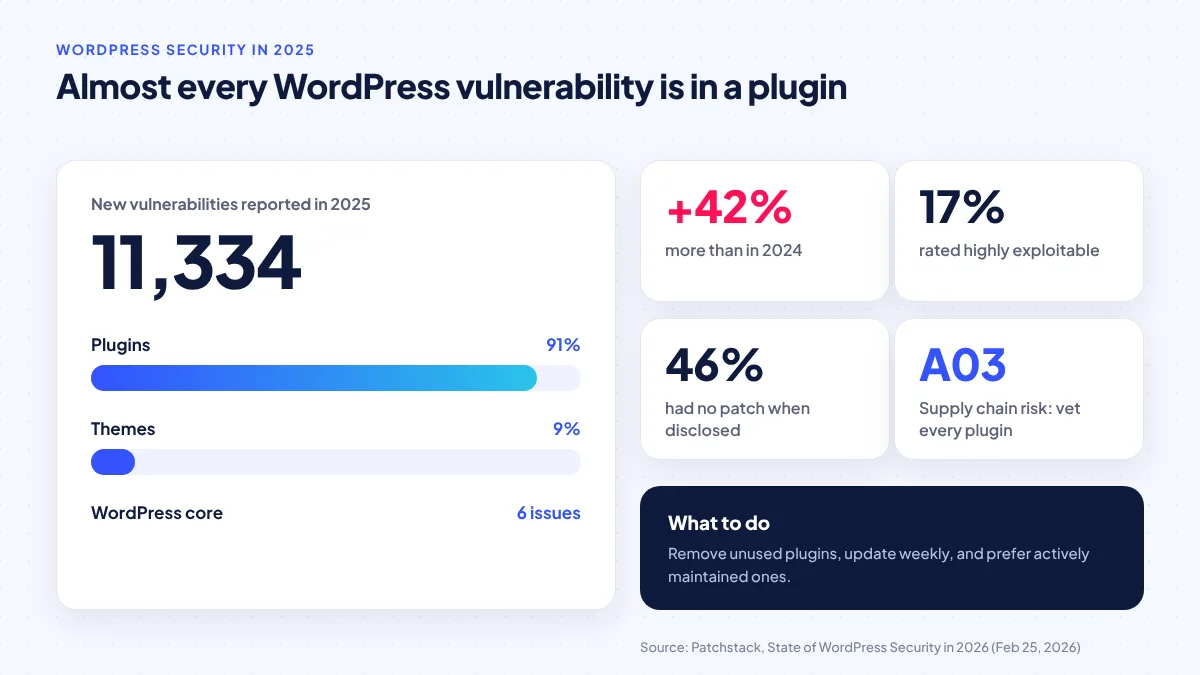
For WordPress sites, which many Philippine SMEs use, Patchstack’s State of WordPress Security in 2026 (February 25, 2026) counted 11,334 new vulnerabilities in 2025, up 42%. Plugins accounted for 91%, themes 9%, and WordPress core just 6 issues. Patchstack rated 17% as highly exploitable and said 46% had no patch available at the time of disclosure.
Most small-business breaches are not clever. They are an old plugin, an open admin panel or a password that was never changed.
The OWASP Top 10:2025 in plain language
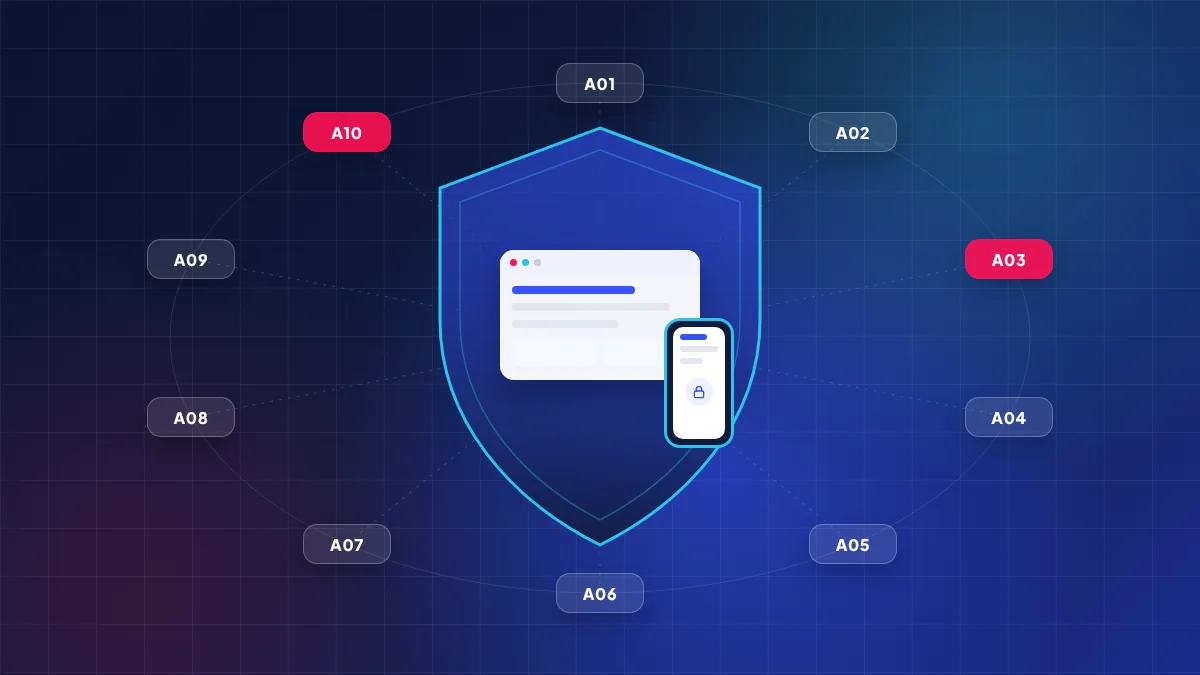
The categories below follow the official OWASP Top 10:2025. The examples are ServicioPro’s illustrations of how each risk tends to appear in Philippine SME systems.
A01: Broken Access Control
Users can see or do things they should not. A customer changes the order number in a URL and sees another customer’s address; a cashier account can open the owner’s sales report. In 2025 OWASP also folded server-side request forgery (tricking a server into fetching internal resources) into this category. Ask your developer: is every request checked on the server for “is this user allowed to see this record?”, not just hidden in the menu?
A02: Security Misconfiguration
The software is fine, but settings are not. Examples: debug mode left on in a Laravel or PHP site, showing error details to the public; a database or admin panel reachable from the internet; default passwords on a hosting control panel; a cloud storage bucket of ID photos set to public. This category moved up to second place in 2025.
A03: Software Supply Chain Failures (new)
Your system is only as safe as the code it borrows. This new category expands the old “vulnerable and outdated components” risk to the whole chain: plugins, themes, open-source libraries, build tools and the accounts that publish updates. For a WordPress shop, an abandoned plugin is a supply chain risk. For a mobile app, an outdated SDK is. Keep a list of what you use, remove what you do not, and update on a schedule.
A04: Cryptographic Failures
Sensitive data is not properly protected. Examples: passwords stored in plain text or with weak hashing, a site still reachable over plain HTTP, or customer ID numbers stored unencrypted in a database backup on a shared drive.
A05: Injection
An attacker sends input that the system treats as a command. Classic SQL injection through a search box or login form is the best-known case; cross-site scripting, where a malicious script is planted in a review or chat message, also belongs here. Modern frameworks protect against much of this by default, which is why hand-written database queries deserve extra review.
A06: Insecure Design
The flaw is in the plan, not the code. A booking system that lets anyone cancel any reservation with only a phone number, or a promo code feature with no limit on attempts, is insecure by design. Fixing this means thinking through abuse cases before building: “How could someone misuse this feature?”
A07: Authentication Failures
Weaknesses in how users prove who they are: no limit on login attempts, weak password rules, one-time PINs that never expire, or sessions that stay valid forever on shared computers. For admin and staff accounts, two-factor authentication is now a reasonable baseline.
A08: Software or Data Integrity Failures
The system trusts code or data without checking it. Examples: an app that downloads updates or configuration without verifying they came from you, or a site that loads scripts from a third-party server you do not control. Automatic deployment pipelines need the same protection as your production server.
A09: Security Logging and Alerting Failures
Something bad happens and nobody notices. If your system does not record failed logins, admin changes and unusual exports, and nobody is alerted, you cannot answer basic questions after an incident. This matters legally in the Philippines, as explained below.
A10: Mishandling of Exceptional Conditions (new)
The system behaves badly when something unexpected happens: a payment callback arrives twice, a network timeout occurs mid-transaction, or an error message reveals file paths and database names. A typical SME example is an online shop that marks an order as “paid” when the payment gateway returns an error it did not anticipate. Good error handling “fails closed”: when in doubt, deny and log.
How the risks map to a typical Philippine SME setup
The table below is ServicioPro’s analysis of where each category most often shows up in common setups.
| Setup | Most likely risks | First fix |
|---|---|---|
| WordPress business site or WooCommerce shop | A03 supply chain, A02 misconfiguration, A07 authentication | Remove unused plugins, update weekly, enable 2FA for admins |
| Custom Laravel or PHP web app | A01 access control, A02 misconfiguration, A05 injection | Server-side permission checks, debug off, supported PHP version |
| Mobile app with API backend | A01 access control, A04 cryptography, A08 integrity | Authorise every API call, encrypt sensitive fields, verify updates |
| Online payments (e-wallets, QR Ph, cards) | A10 exceptional conditions, A06 insecure design | Verify payment status server-to-server, handle duplicates and timeouts |
| Staff dashboards and admin panels | A01, A07, A09 logging | Role-based access, 2FA, audit logs of exports and changes |
Keeping software within its support window is part of A02 and A03. For example, PHP 8.2 receives security fixes only until December 31, 2026, according to php.net, and Laravel 11 security support ended on March 12, 2026, according to the Laravel release notes. A site on unsupported versions will not receive fixes for newly discovered flaws.
The Philippine legal angle: the Data Privacy Act and the 72-hour rule
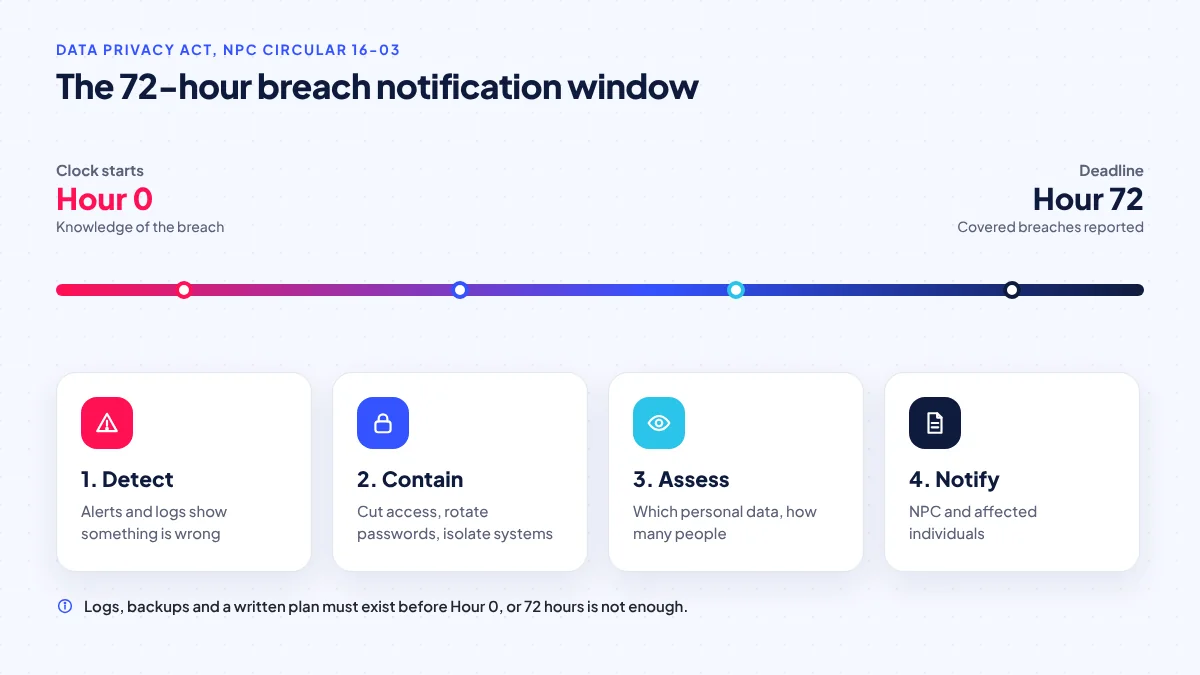
Security weaknesses become legal problems when personal data is exposed. Under the Data Privacy Act (RA 10173) and NPC Circular 16-03, personal information controllers must notify the National Privacy Commission and affected data subjects within 72 hours of knowledge of a covered personal data breach. In 2026, NPC Advisory 2026-02 further clarified that related requests go through the NPC’s own system and that filing a request does not pause the reporting deadlines, according to a Baker McKenzie summary.
Seventy-two hours is very short if you have no logs (A09) and no idea which data was affected. This is why logging, backups and a written incident plan are business necessities, not extras.
For a deeper look at privacy obligations, see our guide on Data Privacy Act compliance for websites and apps and the lessons from the September 2026 government data breaches.
A practical OWASP checklist for SMEs
You do not need an in-house security team to cover the basics. Work through this list with your developer or hosting provider:
- Inventory: list every website, app, plugin, library and admin account you have. Remove what you do not use.
- Update schedule: apply security updates at least weekly for WordPress plugins and promptly for critical framework or server patches.
- Supported versions: confirm your PHP, framework and server OS versions still receive security fixes.
- Access control review: test that a normal user cannot open another user’s records by changing IDs in URLs or API calls.
- Admin hardening: unique admin URLs where possible, two-factor authentication, no shared accounts, remove ex-staff access the same day.
- Configuration: debug mode off in production, HTTPS everywhere, database and admin panels not exposed publicly.
- Payments: confirm payments by server-to-server verification with the gateway, never by trusting the customer’s browser.
- Logging and alerts: log logins, admin changes and data exports; send alerts for repeated failures.
- Backups: automated, off-site, and restored at least once as a test.
- Incident plan: who decides, who contacts the NPC, and how you reach customers within 72 hours.
Questions to ask before you hire a developer
When you commission a website or app, security should be part of the quote, not an afterthought. Ask:
- How do you check permissions on every page and API endpoint?
- Which plugins or libraries will you use, and who maintains them?
- How will updates be handled after launch, and at what cost?
- Where are backups stored, and have you tested restoring them?
- What gets logged, and who sees the alerts?
- How does the payment flow handle failed, duplicate or delayed callbacks?
Our guide on how to choose a web developer in the Philippines has more questions, and our WordPress in 2026 article covers plugin hygiene in detail.
Frequently asked questions
Is the OWASP Top 10 a legal requirement in the Philippines?
No. It is a widely used industry reference, not a law. However, the Data Privacy Act requires reasonable security measures for personal data, and the OWASP Top 10 is a common way to show you have considered the main risks.
What is new in the 2025 edition?
Two new categories: A03 Software Supply Chain Failures, which expands the old outdated-components risk, and A10 Mishandling of Exceptional Conditions. Security Misconfiguration moved up to A02, and server-side request forgery was merged into A01 Broken Access Control.
My site is a simple WordPress brochure site. Does this apply to me?
Yes. Even simple sites can be hacked through outdated plugins and weak admin passwords, then used to spread malware or spam, which harms your reputation and search rankings. The supply chain, misconfiguration and authentication items are the most relevant.
How fast must I report a data breach?
Under NPC Circular 16-03, covered personal data breaches must be notified to the NPC and affected individuals within 72 hours of knowledge. Check the circular and NPC advisories, and consult a lawyer for your specific situation.
How often should a security review be done?
Review after every major feature release and at least once a year, with weekly routine updates in between. Systems that handle payments or sensitive personal data deserve more frequent checks.
Sources
Researched October 26, 2026. Dates show when each source was published.
- OWASP Top 10:2025 Introduction, OWASP Foundation, 2025.
- 2026 Data Breach Investigations Report, Verizon, 2026.
- State of WordPress Security in 2026, Patchstack, February 25, 2026.
- CISA KEV Catalog Expanded 20% in 2025, Topping 1,480 Entries, SecurityWeek, accessed October 26, 2026.
- NPC Circular 16-03: Personal Data Breach Management, National Privacy Commission, 2016.
- Philippines: Data breach notification procedure further clarified, Baker McKenzie, June 2026.
- NPC confirms no data breach in GCash systems after probe, Newsbytes.PH, October 30, 2025.
- Supported Versions, PHP.net, accessed October 26, 2026.
- Laravel 13 Release Notes, Laravel, March 17, 2026.